ConvertCap

1

IMPORT MEDIA

Drop Media Here

•Supported: MP4, WebM, MKV, MOV, GIF, AVIF, WebP, ZIP
•Image sequence: multiple stills (.png / .webp / .jpg) = 1 single media (auto-merge)
2

Choose target platform & cap

CUSTOM CAPActive
10 MB
TARGET LIMIT
Cap Fill Target
95%
4

RESULT

WebP
Target: Up to 10MB
3 free conversions remaining today
WHY USE CONVERTCAP?

Why I built ConvertCap.

I was tired of manually tweaking sliders on old websites just to make a video fit, only to find it ugly.

As a creator, I was wasting hours per week through mindless trial and error: guessing resolutions, adjusting framerates, and hoping it wouldn't look blurry.

So I built ConvertCap to save my own time and kill that headache.

Now, I just drop my file, close my eyes, and let the code find the sharpest visual quality that physically fits my cap. While it processes, I can actually do things I enjoy: work on my next animation, watch videos, read comments.

So in the end, ConvertCap became more than just a converter that keeps your work sharp, it became a way to get your time back.

— Built by a solo creator and expanded for other creators and users.

The 10 MB test: CloudConvert vs ConvertCap

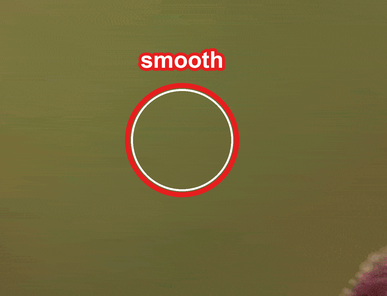
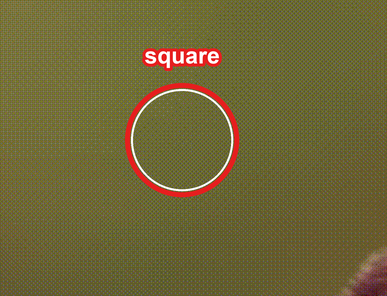
Same 1-second clip, same image size, same 10 MB cap. ConvertCap keeps the motion smooth; CloudConvert stutters and adds a grid of squares.

Visual proof
ConvertCap (Gifski Engine)
CloudConvert
1:1 detail100% zoom
100% crop of the ConvertCap GIF background at native pixels: a smooth green gradient with no visible dither grid. A red circle marks the same spot as the CloudConvert crop and is labelled smooth.
100% crop of the CloudConvert GIF background at native pixels: a regular crosshatch of olive and blue-grey squares, the visible ordered-dither grid, circled in red and labelled square.
Resolution & Area
ConvertCap2764 × 1554 px (4.30 MP)
CloudConvert2764 × 1554 px (4.30 MP)
Motion & Smoothness
ConvertCap25 FPS — 26 of 31 source frames (84% kept)
CloudConvert16 FPS — 18 of 31 source frames (58% kept)
Color Palette
ConvertCapAdaptive 256-color palette (256 used in frame 0)
CloudConvertFixed RGB332 cube (105 used in frame 0)
Dithering & Artifacts
ConvertCapNo dither grid
CloudConvert8×8 ordered (Bayer) dither — visible crosshatch
Byte Budget Used
ConvertCap9.98 MB — 99.8% used; 0.02 MB left unused
CloudConvert9.72 MB — 97.2% used; 0.28 MB (2.8%) wasted
Creator Effort
ConvertCapType 10 MB, one click
CloudConvertManual width / fps / trim, then retry

1:1 crops of the same region at native pixels.

The 2 MB test: ConvertCap vs Ezgif

Ezgif's clip is smaller in resolution (320 px against 414 px), drops half its frames and stutters at 8 fps; ConvertCap's is bigger, sharper and smoother, keeping all 81 frames at 16 fps.

Visual proof
ConvertCap (Gifski Engine)
Ezgif (Gifski Engine)
Resolution (same display size)
ConvertCap414 × 414 px — 67% more pixels, sharper
Ezgif320 × 320 px — upscaled to 414 — blurrier, as shown in her eyes and face
Motion & Smoothness
ConvertCap16 FPS — 100% of the source motion, smooth
Ezgif8 FPS — only 50% of the source motion, stuttering
Frames Preserved
ConvertCap81 of 81 frames (100% kept)
Ezgif41 of 81 frames (51% kept — 40 deleted)
Byte Budget Used
ConvertCap1.99 MB — 99.3% used; 0.01 MB left unused
Ezgif1.86 MB — 93.1% used; 0.14 MB (6.9%) wasted
Creator Effort
ConvertCap0 attempts — 1 click automatic
EzgifManual trial-and-error guessing

Visual Format Comparison

AVIF🚀 Highest Quality

Next-generation AV1 image/video container offering high compression efficiency for modern web browsers.

Compression Efficiency95%
95% Benchmark — Next-Gen AV1 King
MP4🎬 Full Motion Video

Universal video container delivering smooth 60fps playback with ultra-low byte weight.

Compression Efficiency95%
95% Benchmark — Motion Video Leader
WebP⚡ Universal Standard

Modern format delivering 25-34% smaller file sizes than PNG/JPEG with animation and alpha transparency.

Compression Efficiency82%
82% Benchmark — Universal Web Standard
GIF⚠️ Heavy Legacy Format

Legacy 256-color format for chat apps, resulting in significantly larger file sizes per frame.

Compression Efficiency18%
18% Benchmark — Legacy 1987 Format
APNGLossless Alpha

Lossless format: 24-bit PNG frames with 8-bit alpha and no colour banding like GIF. Built for PNG/APNG uses — Discord stickers, Steam artwork — where the frame budget is what has to stay tight.

Compression EfficiencyLossless
Lossless
No ratio benchmark: quality is fixed, so the only levers are frame count and palette depth.
CREATOR PLANS & PASSES

Start Free. Upgrade Only When You Need Unlimited Power.

FOUNDER LIFETIME PASS — LIMITED TO 50 SPOTS ONLY

Get permanent unlimited access to the 250MB Pro Creator plan. Once the 50 spots are filled, this tier will be permanently retired.

Starter Free
🎁 5 Daily Conversions
0€ / forever

Essential compression for casual creators and social media.

  • Daily limit: 5 free conversions per day (3 without an account)
  • Cap fill: aims for ~95% of the size limit (fast pass)
  • Output cap: 10 MB ceiling (ideal for Discord Free & email)
  • Source size: 50 MB max per file
  • Presets: 1-click social targets (Discord, Twitter, Reddit)
  • Queue: 1 conversion at a time (standard lane)
  • Saved recipes: 1 custom preset
RECOMMENDED
Pro Creator
8.99€7.49€ / month
2 months free!

For animators, video editors, and frequent creators.

  • Volume: 100% unlimited daily conversions + priority queue
  • Cap fill: aims for ~99% of the size limit (precision passes)
  • Output cap: unlocked up to 50 MB (Discord Nitro & Twitter HD)
  • Source size: up to 250 MB per file
  • Batch: up to 5 videos at once
  • Saved workflows: unlimited custom workflows
Power Studio
24.99€20.83€ / month
2 months free!

Dedicated pipeline for 3D studios, VFX animators & ComfyUI/Blender creators.

  • Everything in Pro: included as-is
  • Source size: heavy media up to 1 GB
  • PNG sequences: direct ZIP support (Blender, AE, ComfyUI)
  • Multi-format: export every web format in one click
  • Mega-batch: up to 25 files at once

Frequently Asked Questions

Everything you need to know about plans, privacy, and precision.